25,000 Photos and Videos Later
For as long as I’ve lived I’ve had some form of camera easily accessible; so from about the age of 5, I’ve taken photos on iPods (touch), DSi’s and to date my phone when I got one. One day in about 2018 I started backing these up and as of writing I have over 25,000 photos and videos and ever since then they’ve sat on my a small harddrive labeled Archive and broadly sorted into folders like Screenshots, Family and Events.
Now it goes without saying that this isn’t an optimal system but to be fair I was probably about 14 when I started doing this, this also has these other neat issues:
- Duplicate Files
- Not very accurate sorting systems (I used folders so an image can’t belong to multiple categories.)
- Not accessible on the go
Now I’m older (and hopefully wiser), I decided to set about fixing it. So how do you fix this?
Part 1: What’s inside?
Before we can do anything else, its first probably best to find out how I’m actually storing these files; after all its from multiple different devices so its in many different formats.
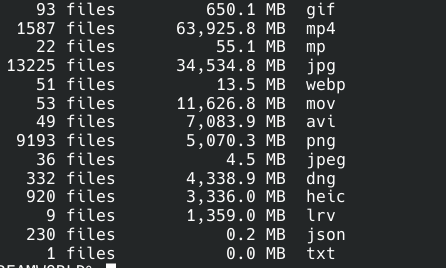
A quick terminal command gives us a breakdown of every file type that is in there. 
So thats obviously a lot of different stuff, so first lets do some manual clean up.
- I converted the .ico (icon file), .pdn (paint.net file), .LRV (GoPro low res videos), .PDF (mis-scanned family photos), .bmp to .PNG files.
- I converted .3GP (Old video format), .WEBM (videos only), .MKV, to MP4.
- I deleted or moved the .JSON (Google Photos Metadata), .ini (Windows Desktop Files), .db (Windows Thumbs.db Files), .AAE (iOS Image Edit sidecar files)
These manual clean ups make some of the later setups much easier and now it looks like this.
Part 2: Normalisation
Now while I am going to put these files into a photo management tool, I still want to keep these around as a sort of easy backup so
I converted my video files to H265 .MKV and my photos to .WEBP, for this I just got claude to write up a simple script to convert them and it took a few tweaks but it worked really well.
Ultimately this shrinked my data by 42% (129GB -> 74GB) and this means I can now just fit this on a few USB Sticks for easy backups. 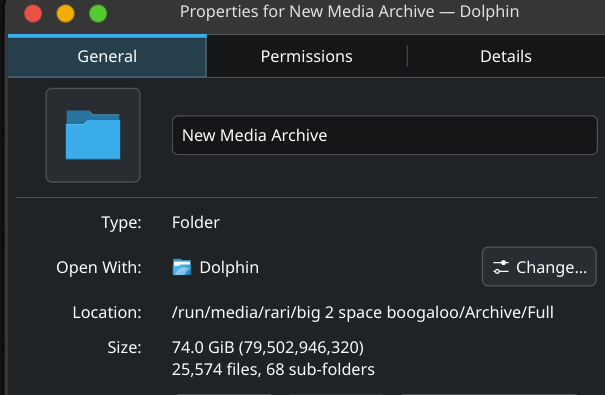
Why this works:
Encoding is how your data is represented, over the years we have had many different encodings such as H264, H265 and AV1 for videos and AVIF for photos. At the time of writing AV1 is the best commonly available encoding but in time something will likely surplant AV1.
Since I have a lot of old media, its using older encodings that aren’t as efficent as more modern encodings and by spending the time to reencode them to the newer formats I save a significant amount of space.
These newer formats do have a drawback that computers need to support them to be able to view them which is easy becuase software decoding is significantly less burdensome than encoding it.
Decoding via Software works but having native hardware to do it makes it much quicker and energy efficent, the same is true for encoding however software encoding is very slow, for reference it took about 6 hours to reencode all my photos and videos on my 30-Series card which has hardware encoding and decoding support for H265 but only supports AV1 hardware decoding so if I decided to encode to AV1 it would take many times longer as I do not have AV1 Hardware Encoding support.
One day when I upgrade my GPU it will have AV1 decode and encode support (40-series cards do already) and I could save another 10-20% on filesize on top of this by reencoding to AV1.
Part 3: Deduplication
Over the years I’ve exported the same video/photo multiple times so I got claude to write another script to deduplicate these and this saved another 10GB which is neat.
Although while I was doing this I didn’t realize that immich actually includes a duplicate checker tool. 
Part 4: Immich
I decided to self host Immich which is a google photos alternative, this is great because it means I don’t need to pay google for storage but also means I am responsible for dataloss and the machine that hosts my Immich instance.
Since I’m only hosting my data I just decided to install docker on my PC and host it there and to access it I set up and configured tailscale so I wouldn’t need to expose my Immich instance to the world.
To ingest all my files, I used the Immich CLI tool to bulk import everthing use the folders as albums.
And that’s it, ever since then Immich has worked fine and I’ve just had to recompose and reload the docker instance to update it.
This is all I ever wanted.